Search engines exist to answer questions
A search engine is a program that reads the web on your behalf, organizes what it finds, and gives back the most useful results when you ask it something. Google, Bing, and DuckDuckGo are search engines. ChatGPT, Perplexity, and Gemini are AI answer engines that sit on top of the same idea, with an extra step at the end.
Underneath the user-facing query box, every search engine does three things in order: it discovers content, it stores it, and it ranks it. These three jobs have official names that you will see everywhere in SEO writing: crawling, indexing, and ranking. Learn them once, and the rest of this guide will read like a series of footnotes on the same three ideas.

The diagram above is the whole field. Most SEO advice that confuses beginners makes more sense once you map it back to one of these three boxes. Internal linking? That helps crawling. Schema markup? That helps indexing. Backlinks and engagement? Those feed ranking. The vocabulary changes, the three boxes do not.
Crawling is how the web gets discovered
A crawler is a program that opens a page, reads the links on it, opens those, reads the links on those, and so on. The crawler used by Google is called Googlebot. Bing has Bingbot. Anthropic has ClaudeBot. They all behave roughly the same way, with different priorities and different politeness rules.
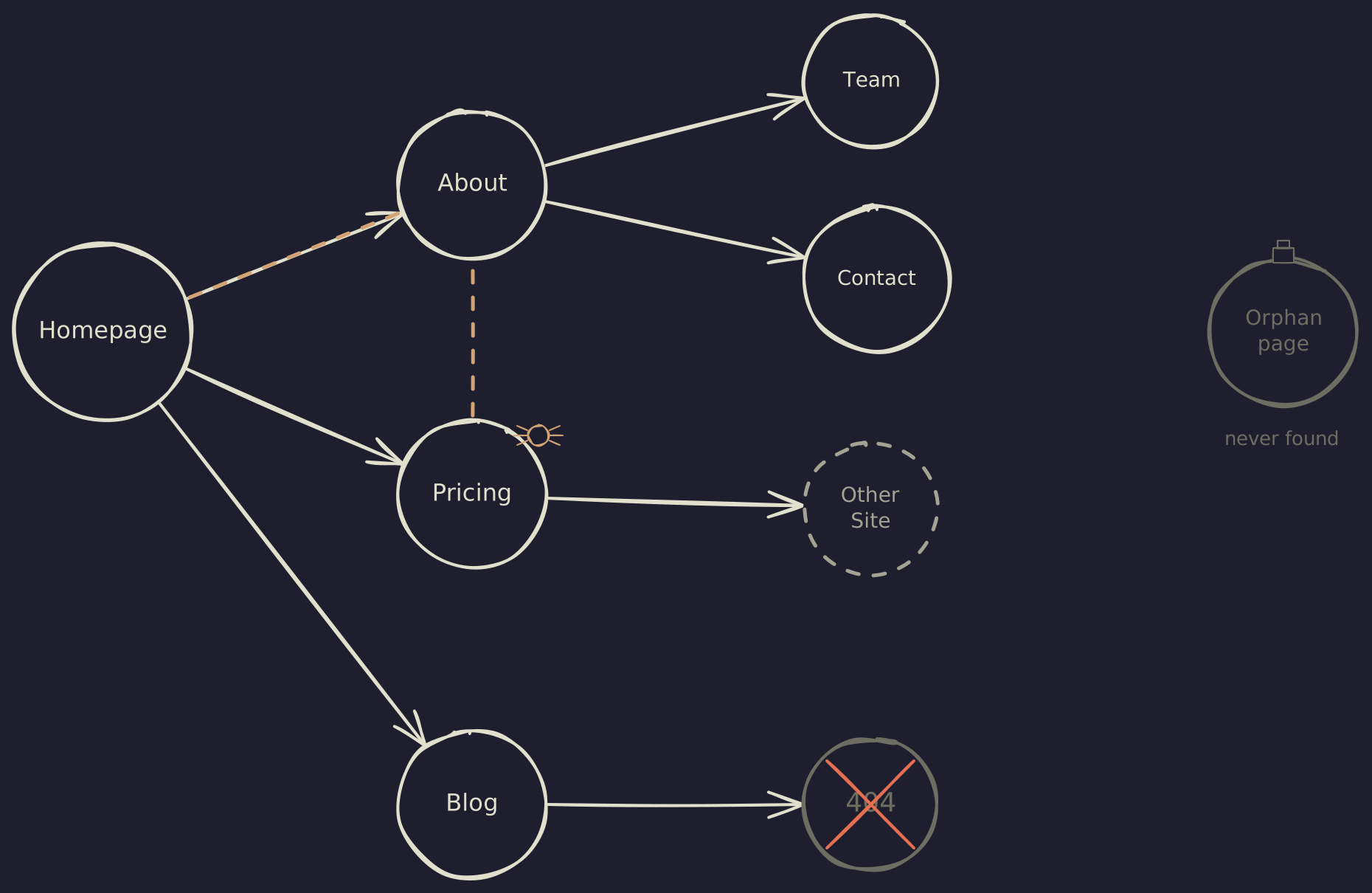
The crawler does not know your page exists until something points it there. That something is usually a link, from another site or from somewhere else on your own site. If a page has no incoming links at all, the crawler will not find it on its own, and you have to tell it where to look by submitting a sitemap A sitemap is an XML file listing every URL on your site that you want crawled. You submit it through Google Search Console once, and Google checks it periodically. It is not a guarantee of crawling, but it is the cheapest way to make sure nothing important is missed. through Google Search Console.
Three things can stop a crawler that has found you from reading your pages:
- robots.txt: a small text file at
yourdomain.com/robots.txtthat tells crawlers which paths they may not visit. Used badly, it can silently hide your whole site. - Server errors: if the crawler hits a 5xx error or a long timeout, it gives up on that URL and tries again later. Repeated failures shrink how much of your site gets crawled.
- Broken links: a 404 is fine in moderation. A 404 on a page that used to rank means the page falls out of the index and traffic disappears.
A page does not have to be crawled often to rank. The crawler comes back to popular, frequently-updated sites more often than it comes to a small site that rarely changes. That is normal. You only need to worry about crawl frequency when you change a lot of pages at once and need them re-read quickly.
Indexing is how content gets stored
After the crawler reads a page, the search engine has to decide what the page is about and where to file it. That filing system is the index: a very large, very fast database of every page the engine considers good enough to serve.
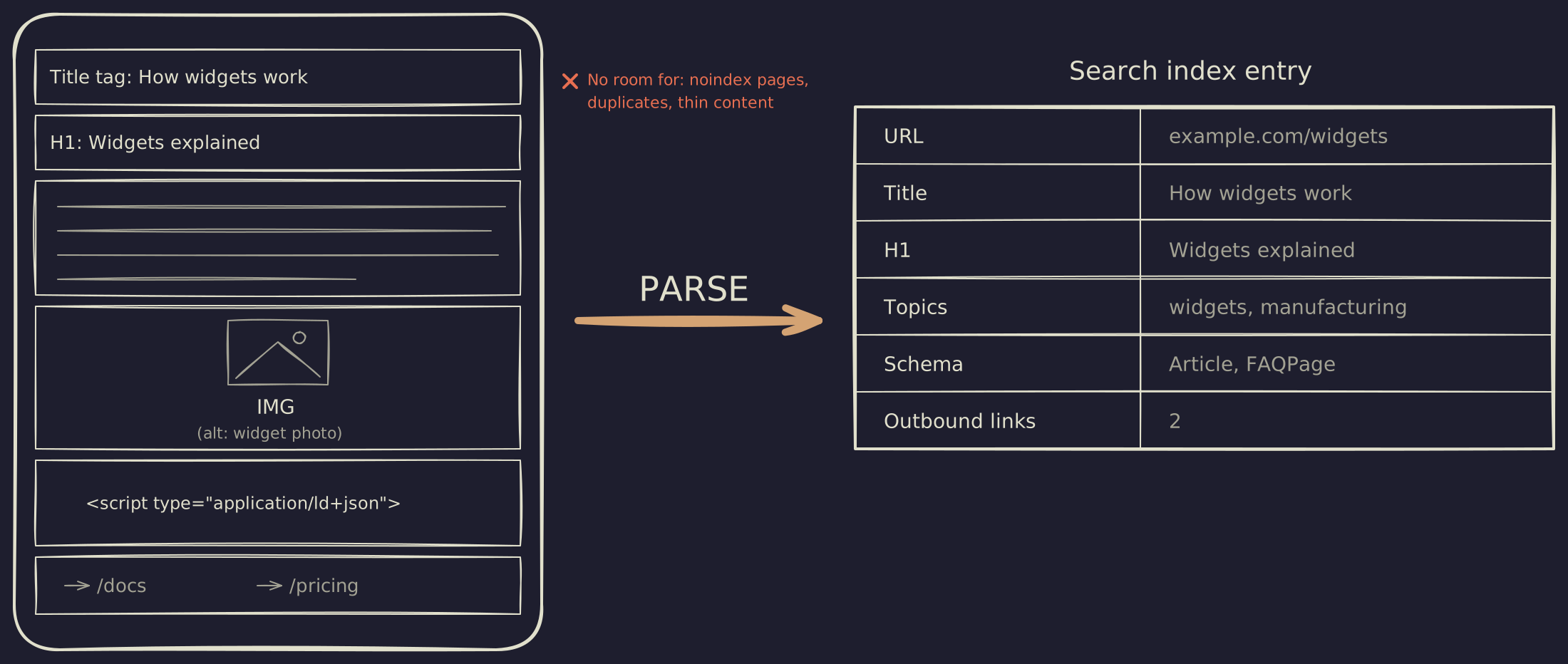
Not every page that gets crawled ends up in the index. The search engine may skip a page because:
- The page has a
noindexmeta tag (the site told it not to) - The content duplicates another page already indexed
- The page is so thin or low-quality that the engine decides it is not worth storing
- The page returned an error when the engine tried to render it
One detail that catches people out: Google primarily indexes the mobile rendering of your page, not the desktop one. This is called mobile-first indexing and has been the default for new sites since 2019. If your mobile layout hides content that desktop users see, the hidden content is what gets stored. Either render the same words on both, or accept that the engine reads only what mobile users see.
The index stores more than just text. Modern search engines also store the structure of your page: which words are in the title tag, which are headings, what schema markup Schema markup, also called structured data or JSON-LD, is a small block of code you add to a page that describes what the page is in a machine-readable way. We cover this in detail in chapter 5. you have declared, what other pages you link to. All of that becomes searchable metadata that the ranker can use later.
-
How do I check if my page is indexed?
Type site:yourdomain.com/path-to-page into Google. If the page comes back, it is in the index. If nothing comes back, it is not. For a more detailed view, use Google Search Console's URL Inspection tool, which tells you exactly when the page was last crawled and whether it was indexed. -
Why is my page indexed but not ranking?
Indexing and ranking are different jobs. Being in the index means the page is eligible to appear in results. Ranking is whether it actually does. A new page is often indexed within hours but takes weeks to months to find its position for a given query, as the algorithm watches user behavior to figure out where it belongs.
Ranking is how results get ordered
When a user types a query, the search engine looks at every relevant page in its index and asks: which one of these is the best answer? The mechanism that does the asking is the ranking algorithm, and it weighs hundreds of signals to produce a single ordered list.
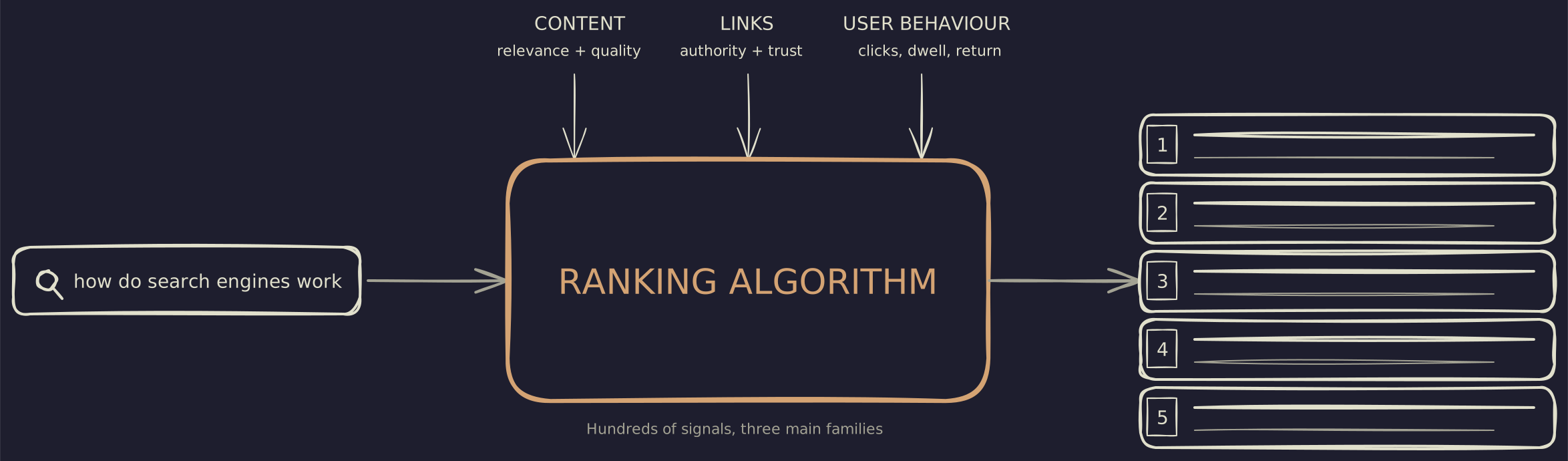
You will hear about specific named pieces of the algorithm. Most of them fall into three families.
Content signals are about the page itself. Does the page actually answer the query? Are the words and topics relevant? Is the content depth appropriate? This is the part you have the most direct control over. It is also the part where most SEO work happens.
Link signals are about other people’s votes for your page. A backlink from another site is, in the algorithm’s view, a vote of confidence. A backlink from a trusted site is a heavier vote. The original idea, called PageRank PageRank is named after Larry Page, one of Google’s founders. The patent expired in 2019, but the underlying idea, that links are votes weighted by the authority of the linker, still drives most of how authority flows on the modern web. , has evolved a lot since 1998, but the core insight that the structure of links across the web tells you which pages are trustworthy has held up.
User behavior signals are about what people actually do with the results. If users click your result and stay on the page, that is a positive signal. If they click and immediately bounce back to the SERP to choose a different result, that is a negative signal Google has confirmed it uses.
There are other named components: RankBrain (machine-learning re-ranker), BERT (natural-language understanding), MUM (multimodal understanding). For a beginner the right mental model is that these all sit inside the ranking algorithm and help it understand queries and content more deeply. You do not optimize for them directly; you write content that genuinely answers the query, and they do their job.
The ranked list is also personalized, not universal. Two people searching the same query from different cities, on different devices, or with different recent activity will see different orderings. This is why “I checked and I’m ranking #3” is only true for whoever checked, on that device, at that moment. Ranking trackers work by simulating an anonymous request from a fixed location, which is the closest thing to a stable baseline, but still only one view of a result that does not really have a single canonical answer.
A modern SERP is more than ten blue links
The output of the ranker is no longer a tidy list of ten organic results. A typical Google result page in 2026 includes an AI Overview at the top (a Google-generated answer with citations), a featured snippet (one page promoted into a quotable box), a People Also Ask block, a knowledge panel for branded queries, video carousels, and sometimes a map pack before any of the classic blue links appear. The ranked list is still underneath all of it, but for many queries the answer is delivered before the first organic result even loads into view.
This matters because the position most SEO advice still optimizes for, “rank #1 organic”, is now often the fifth or sixth thing on the page. Winning the AI Overview, the featured snippet, or the People Also Ask slot is a different game from winning the organic list. Same page can do both, but the optimization is not identical. Chapter 5 covers the on-page details, and chapter 8 covers the AI surfaces specifically.
AI answer engines added a fourth step
Until 2022, the three-job model was the whole picture. Then ChatGPT happened, and shortly after, Bing’s AI chat, Perplexity, Google’s AI Overviews, and Anthropic’s Claude. These tools do not just rank pages. They read multiple pages and synthesize one answer.
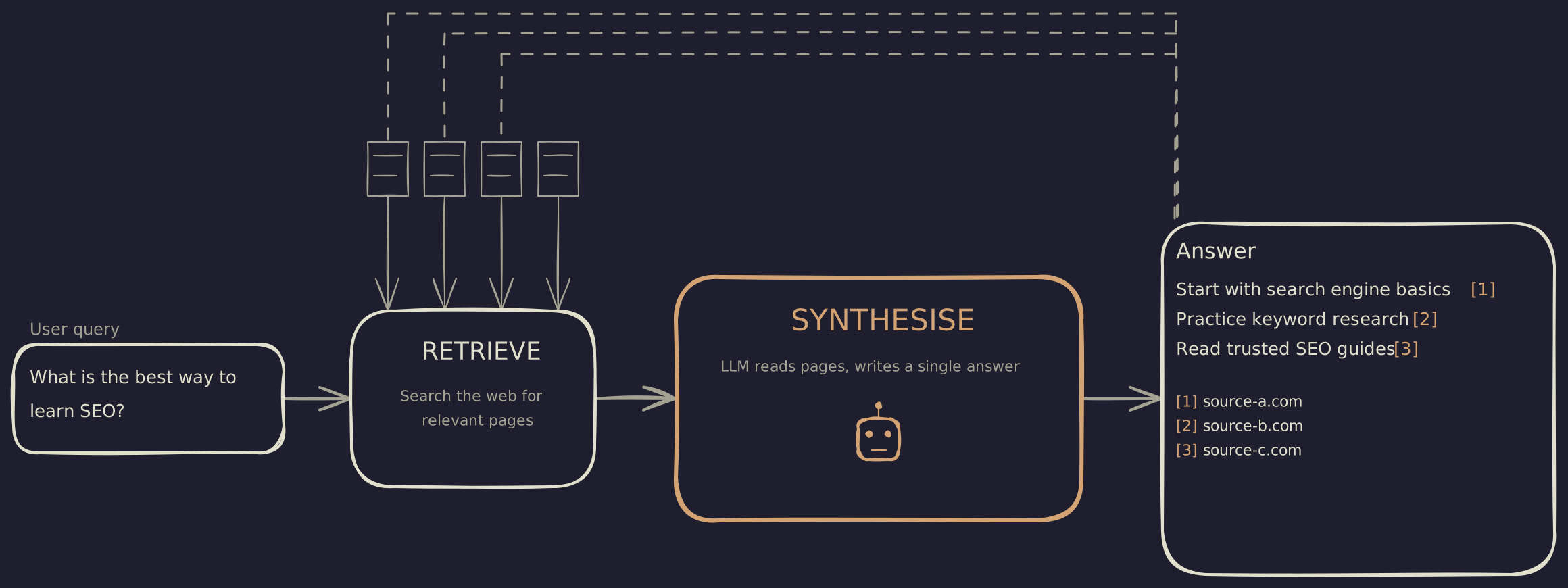
The retrieval step in an AI answer engine is essentially the crawl-index-rank pipeline you already know, often using a regular search engine under the hood. The synthesis step is new. A large language model reads the retrieved pages, picks out the relevant passages, and writes a paragraph of answer using them, citing each page it pulled from.
What changes for site owners is the unit of value. In classic search, the goal is to be the #1 result and get the click. In AI search, the goal is to be cited by the model in its synthesis, which may or may not produce a click. The same content can work for both, but the optimization is subtly different.
The good news for beginners is that you do not have to optimize for the two channels separately. A page that is well structured, factually clear, and trustworthy works for both. The bad news is that the metrics are different, and the dashboards you may have relied on (Google Search Console) only tell you about the classic search side. Tracking AI citations is a newer practice with rougher tools.
What this means for your site
If you are setting up a new site, or trying to fix one that is not getting traffic, the order of operations follows the same three-then-four steps.
- 01
Make sure you are crawlable
Open yoursite.com/robots.txt and confirm it is not blocking the whole site. Submit a sitemap in Google Search Console. Check that your main pages have at least one internal link pointing to them. If you are crawlable, the engine can find you. - 02
Make sure you are indexable
Use the URL Inspection tool in Search Console for your top 5 pages. Confirm each one is indexed. Pages that are crawled but not indexed usually have a noindex tag, a duplicate content issue, or are too thin. Fix those before doing anything else. - 03
Make sure you deserve to rank
For your top target queries, look at the results that currently rank. Read the top 3 results carefully. Honestly assess whether your page is at least as useful, as clear, and as trustworthy as those. If it is not, no amount of tactical SEO will move it up. - 04
Make sure you are quotable
Use clear, factual sentences. Add FAQ schema or Article schema where appropriate. Provide concrete numbers and sources. AI answer engines pull quotable, structured sentences, not vague generalisations.
The rest of this guide goes deeper into each of those four steps. Chapter 2 covers the SEO basics, chapter 3 covers keyword research, chapter 5 covers on-page details, chapter 7 covers technical fixes, and chapter 8 covers AEO specifically. If you understand the four-step model from this chapter, the rest of the guide is just filling in the playbook.