The basics are a small set of structural decisions, not a checklist of tactics
SEO is the practice of making your site easy for search engines to find, understand, and recommend. The basics, for someone who ships code but has never opened Google Search Console, are four structural decisions made before content marketing starts. How URLs are shaped, which version is canonical, how internal links route signal between pages, and what to track. Everything else under “SEO basics” is downstream of one of those four.
The default outcome of skipping the work is a launch that goes well and then organic search sending a trickle a few weeks later. That is not bad luck. The fix is upstream of marketing.
Chapter 1 broke search engines down into three jobs (crawl, index, rank), and noted that AI answer engines add a fourth (synthesize and cite). Every basic in this chapter makes one of those four jobs cheaper for the engine, which makes rankings and citations cheaper for the product.
The decisions compound because each one keeps paying long after the work is done. A sitemap submitted once surfaces new URLs as the build regenerates it. A canonical URL on a layout template deduplicates every variant. An internal-link pattern routes authority without anyone touching it again.
A sitemap and a clean robots file are how Google finds you on purpose
Search engines find your pages by following links from page to page, the same way you do clicking around. That process is called crawling, and the program doing it is called a crawler. Googlebot is Google’s. Bingbot is Bing’s. ClaudeBot is Anthropic’s. Each one needs starting points and a path through your site, and a sitemap plus a clean robots file are how you give it both on purpose.
A sitemap is an XML file listing every URL you want a search engine to know about. robots.txt is a tiny text file at your domain’s root that tells crawlers which paths are off-limits, and chapter 7 on technical SEO covers the per-crawler rules for Google and AI bots. Together they cover the cases internal links miss, a new /pricing route with no inbound links, a buried changelog, a /preview path that should never reach Google. Google says changes take hours to several months to surface.
Most frameworks generate the sitemap for you. Next.js ships app/sitemap.ts, Astro has @astrojs/sitemap, SvelteKit has community plugins. The work is verifying the file lists the URLs you actually care about and skips the rest, preview deploys, draft routes, admin paths.
The minimum viable robots file is shorter than most expect. Three lines and a sitemap reference.
User-agent: *
Allow: /

Sitemap: https://yoursite.com/sitemap.xmlSubmit the sitemap once through Google Search Console and let it recheck on its own schedule. The file is a hint, not a guarantee, and the platform decides which URLs are worth crawling Crawl budget is the number of URLs Googlebot will fetch during a given window. Small product sites rarely hit the ceiling, large ones with thousands of generated pages can, which is why every garbage URL exposed is one fewer good URL crawled. .
Every page needs one canonical URL, and one only
Search engines treat every unique URL as a separate page. If your homepage is reachable at four URLs (yoursite.com, www.yoursite.com, yoursite.com/, yoursite.com/?utm_source=producthunt), the engine sees four pages even though you wrote one. The votes that say “this page is worth ranking” (links from other sites, time spent reading, returning visitors) get split across the four copies, and none accumulates enough signal to win Google supports rel=canonical as a hint, not a directive, so an obviously wrong canonical gets ignored. Consistent signals beat clever ones. .
A canonical URL is how you fix that. You add <link rel="canonical" href="..."/> to the head of every variant, pointing to the version you want to count. The engine collapses the signal back onto one page.
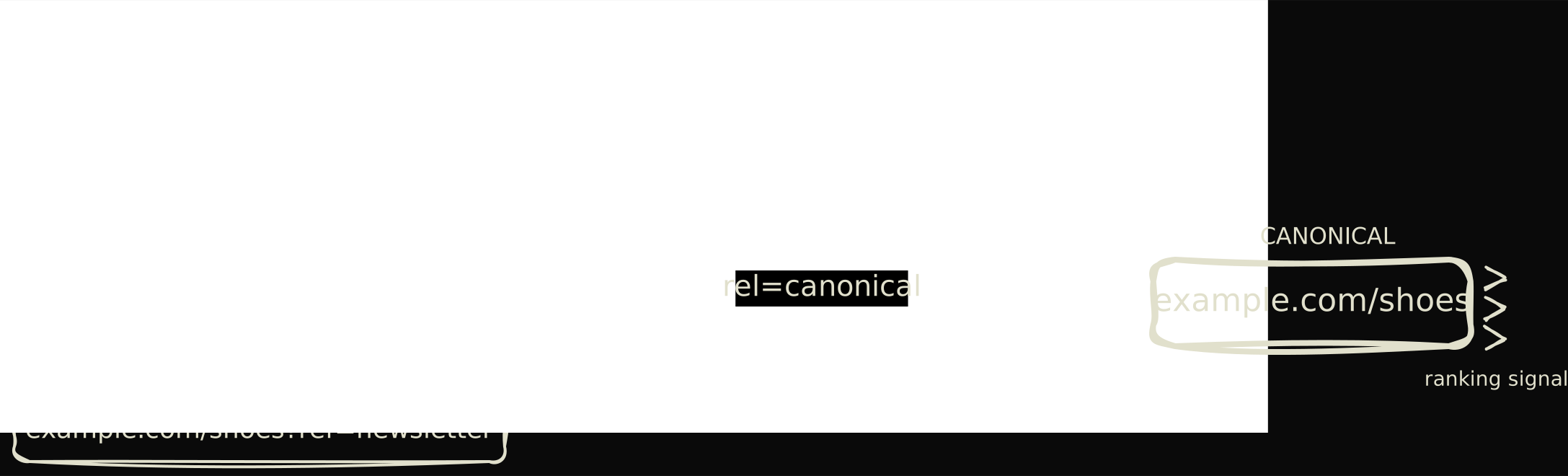
The variants most product sites accidentally serve at launch are predictable. yoursite.com and www.yoursite.com, with and without trailing slash, the launch URL yoursite.com/?utm_source=producthunt, the preview domain your-app.vercel.app that got indexed before the cutover. A canonical tag collapses them into one for search engines while every variant keeps working for users.
Internal links are the single biggest lever a beginner controls
An internal link is a hyperlink from one page on your site to another. A link from your homepage to your /docs is an internal link. A link from your /docs to your /pricing is an internal link. They sound trivial, but they are the cheapest, highest-leverage edit a beginner controls.
Two things make internal links matter. Search engines learn which pages on your site are important by counting how many other pages on your site point to them, and they learn what each page is about by reading the visible text on the links pointing at it. Both signals are entirely under your control, unlike backlinks (links from other sites pointing to yours) which need outreach and time PageRank is the original algorithm Google used to weight pages by inbound links. The patent expired in 2019, but the idea that links flow authority still holds. Practitioners call the routable signal “link equity”. .
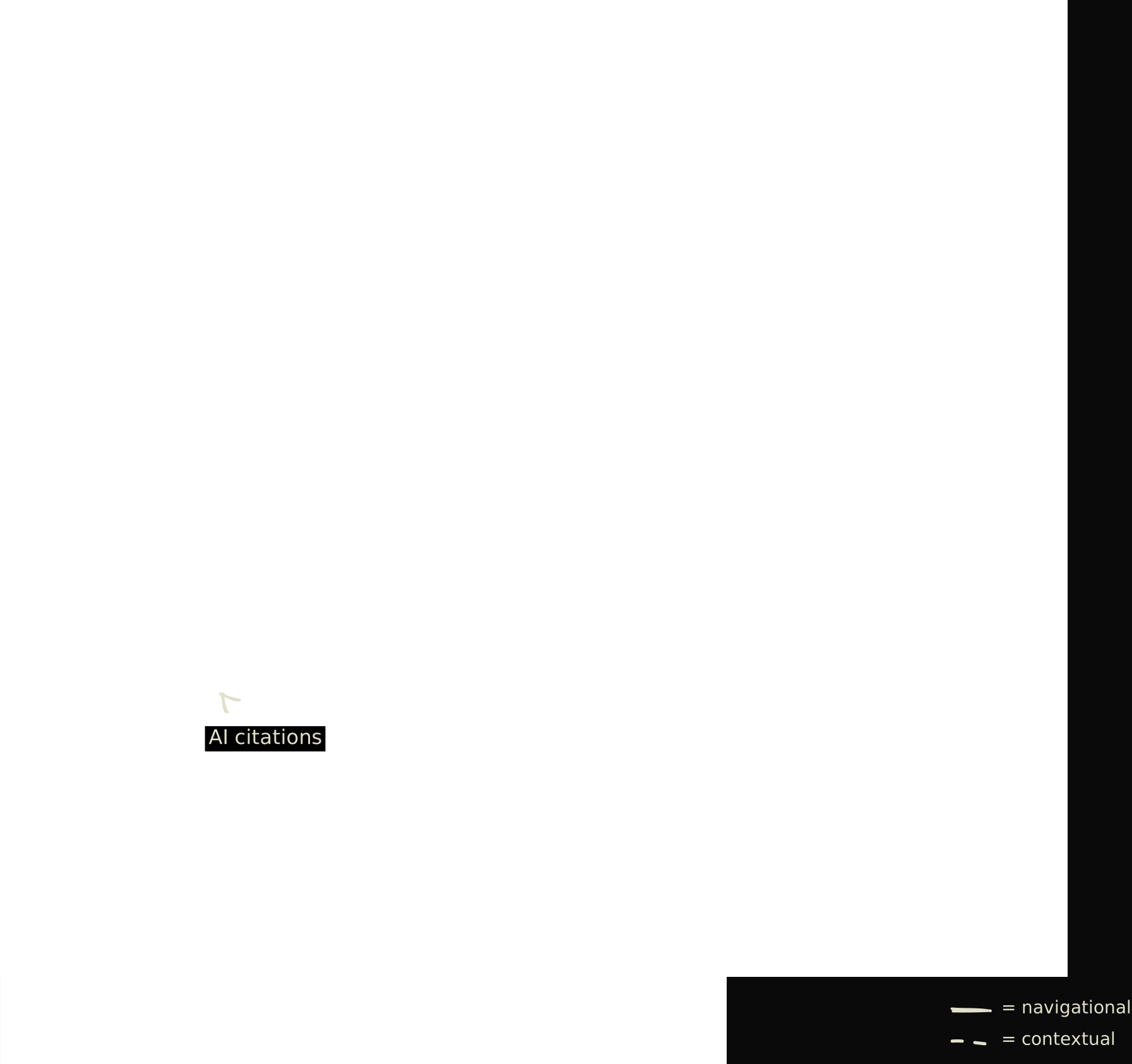
Two link types do the work. Navigational links sit in the header, footer, and sidebar, connecting every page to the main hubs. Contextual links sit inside body copy and route readers to related pages, which is what concentrates signal on the pages worth ranking. The upstream half of this picture sits in the crawling step from chapter 1.
Anchor text is the visible label on a link. Vague anchors waste the slot, descriptive ones do not.
A useful audit is to open the top five pages by organic traffic and check whether each links to the next three pages a reader would want. Most product sites fail on three of the five. /docs links to itself but not to /pricing, /pricing links to the homepage but not to the relevant docs section, the homepage links to features but not to the docs root. Fixing it costs nothing.
Site architecture should mirror how a reader actually thinks about the topic
Site architecture is the shape of your routes and folders, and a flat topical structure beats a deep folder tree. Flat means any important page sits no more than two clicks from the homepage. Topical means related pages live near each other and share a parent hub. Both shapes matter because crawlers and large language models walk the link graph one hop at a time, and the shallower a page sits, the more often it gets reached, recrawled, and reinforced.
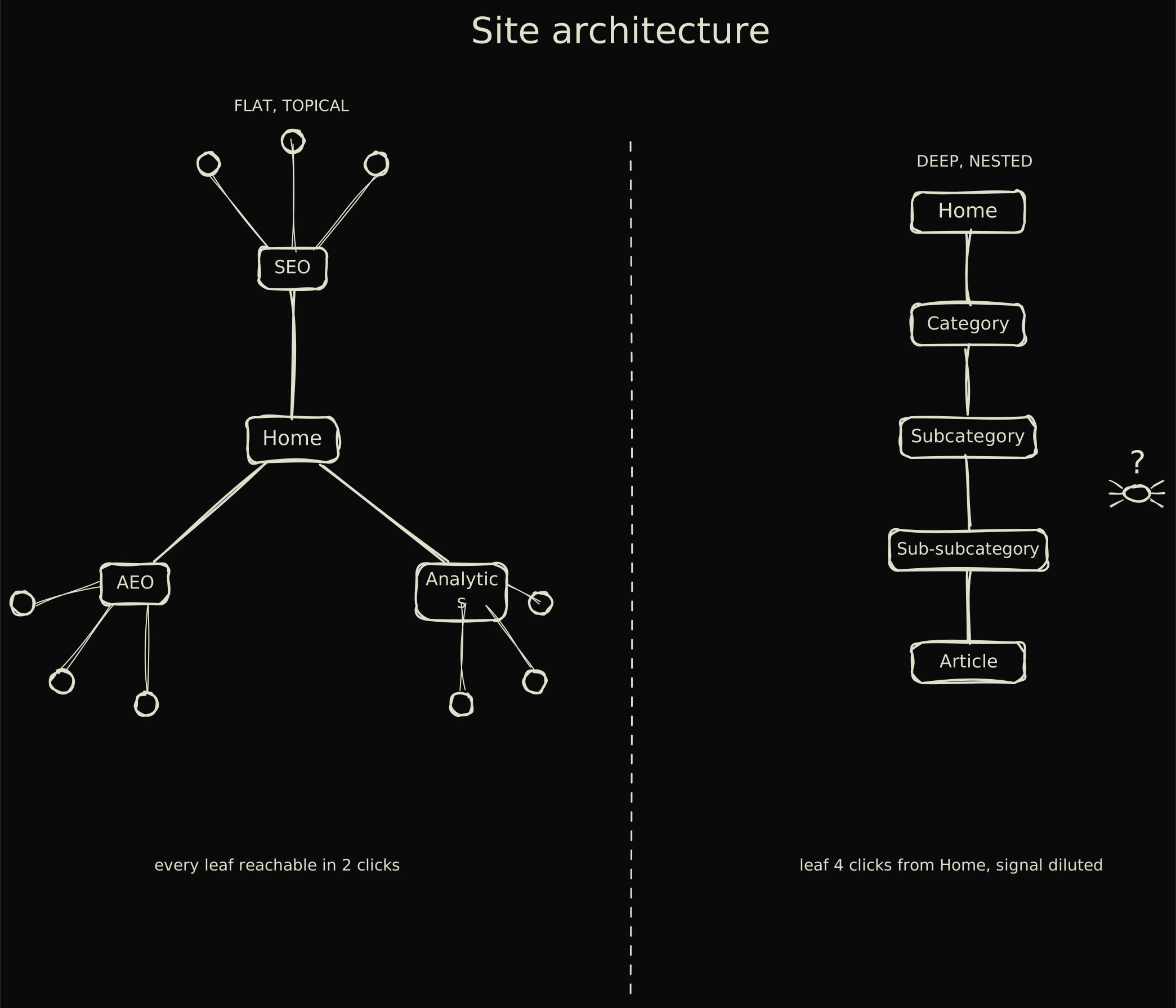
The right panel is the failure mode most early product sites build on day one. A blog post four folders deep, /blog/category/2026/03/post-title, takes four crawl hops, accumulates almost no signal, and rarely ranks. Flatten the route to /blog/post-title and the page moves with the rest of the cluster.
- 01
List the top 20 pages by traffic
Pull the list from Search Console or any tool that segments organic. These pages already earn impressions, so they are the foundation of the cluster work. - 02
Map each one to a topic
Group the 20 into four or five clusters. Each cluster gets a hub, usually the highest-traffic page in that group (often the docs index or a landing page) or a planned one. - 03
Identify the orphans
An orphan has zero internal links pointing to it. Search Console flags some, a crawler like Screaming Frog finds the rest. Orphans get adopted into a cluster or deleted. - 04
Wire the missing links
For every page in a cluster, add two contextual links from siblings and one from the hub. Use descriptive anchor text. The pass takes a few hours and survives every algorithm update afterward.
Technical foundations are mobile-first, fast, and quietly secure
The technical baseline is three things every modern stack handles by default, but worth verifying. Mobile-first rendering, Core Web Vitals, and HTTPS. None is an advantage on its own. All are entry fees. Hosting on Vercel, Cloudflare Pages, Netlify, or Render gives you the trio out of the box, so the work that remains is the structural decisions above.
Mobile-first means Google uses the mobile rendering to decide what gets indexed. If a responsive layout hides paragraphs desktop users see, the hidden ones are what count for ranking. Open Chrome DevTools at 375 wide and confirm every paragraph still renders.
Core Web Vitals Core Web Vitals are three metrics. Largest Contentful Paint (how fast main content loads), Interaction to Next Paint (click responsiveness), Cumulative Layout Shift (how much the layout jumps). Pass thresholds: 2.5 seconds, 200 ms, 0.1. are the speed metrics Google reports for every URL, inside the Search Console Experience tab. Data is from real Chrome users and the report flags the worst pages automatically. A static site on a CDN usually passes without intervention. A heavy single-page app with client-side data fetching often does not.
The same foundations that get a page indexed are what get it cited
The foundations from the last five sections do double duty in 2026. When a user asks ChatGPT or Perplexity a question, the system searches the open web for relevant pages, picks a handful, and writes a single answer citing them. That search-and-fetch step is called retrieval, and it runs on the same rules Googlebot uses. Around 73 percent of pages cited in AI Overviews also rank in the top 10 organically, and the overlap is not a coincidence. A sitemap that helps Googlebot is the file an AI’s retrieval layer reads first. A canonical that consolidates signal is the URL Perplexity cites. Internal links that route a crawler to a deep page are the context that lets an LLM pick which passage answers a prompt.
The GEO work and the SEO work share a single backbone. The budget question is which surfaces to prioritize, not which playbook to follow.
For a builder weighing SEO against AI optimization, the two budgets overlap by most of the work. A YC partner asking ChatGPT about your category pulls from the same retrieval layer that ranks your /docs in Google. Chapter 8 covers the AEO-specific layer on top, prompt-shaped headings, the answer capsule format, schema for entity recognition, but everything here still applies underneath. The four jobs from chapter 1 cover both surfaces, synthesis is just an extra layer on retrieval.
Tracking what matters is a short list, and most dashboards mislead you
Google Search Console is the free dashboard Google provides for site owners. It tells you which queries your pages appear for, how often they show up, how often they get clicked, and which URLs are indexed or rejected. If you have shipped a product site and have not connected Search Console, you are flying blind on whether SEO is working at all, fixing that takes ten minutes through a DNS TXT record or a meta tag.
Useful SEO measurement, once Search Console is connected, is four numbers in this order, impressions, clicks, indexed-page count, conversions from organic. Most agency dashboards bury those four under vanity metrics (scroll depth, time on page, average position across a thousand keywords) that hide whether the work is paying off.
- 01
Impressions, from Google Search Console
Impressions are how often a page appeared in a result, the earliest signal content is finding an audience. The Performance report shows impressions per query and per page. Set this up in week one of launch, not month six. - 02
Clicks, also from Search Console
Clicks are visits from organic results. Together with impressions they give a click-through rate per query. High impressions with low CTR usually means the title and meta description need rewriting, not the page itself. - 03
Indexed-page count, from the Coverage report
Coverage shows how many URLs Google has accepted and rejected, with a reason for each. A product site that suddenly drops indexed pages after a deploy is in trouble, usually a stray noindex or a broken canonical. - 04
Conversions from organic, from GA4 or analytics
Organic conversions tie SEO to signups, paid plans, or whichever event matters. For AI citations, a tracker like Ahrefs Brand Radar or Profound covers what Search Console does not see yet.
-
How long until SEO changes show impact?
Indexing changes (a fixed canonical, a corrected noindex, a new sitemap) usually show up within days. Ranking changes from new content or links take weeks to months, because the algorithm waits for user behavior signals. Big core updates can shuffle positions overnight, but that is weights changing, not the work compounding. -
How do I know my setup is working?
Three checks. Search Console impressions are flat or rising over 28 days, the Coverage report shows your important URLs as Indexed, and robots.txt does not block anything you care about. If all three pass, the basics are doing their job and the next move is content, not infrastructure.
A short list of basics to stop worrying about
A basics chapter is incomplete without naming the practices that look like basics but no longer pay. Skip these and spend the attention elsewhere.
- Keyword density. Modern algorithms use embeddings, not term frequency. Stuffing rarely moves the needle.
- The
meta keywordstag. Google dropped it in 2009. Leave the field blank. - Exact-match domains. Owning
bestcheapwidgets.comwas an edge in 2010. Today it reads as low trust. - Thin schema spam. Marking up content that does not match the schema type triggers manual penalties. FAQ schema without visible Q and A is the common offender, and worth keeping even after Google dropped the rich result.
llms.txt. No major AI platform reads it as of April 2026, adoption sits in the low single digits with no measured retrieval lift.- Fake
dateModifiedbumps. Models compare versions across crawls and flag pages where the date moved but the body did not, costing trust rather than buying freshness.
The basics, named one more time
The basics that compound are four structural decisions. A sitemap and clean robots file that make discovery intentional. A canonical URL on every page so signal stops splitting. Internal links through a flat, topical architecture. A tracking setup that watches impressions, clicks, indexed pages, and organic conversions, in that order.
Those four take an afternoon and keep working through the next pivot, redesign, and relaunch. The same backbone serves Google and AI answer engines, so the work is not split between two budgets. A page that crawls and indexes well retrieves and gets cited. Synthesis is new, the structure underneath is not.
Chapter 3 covers keyword research, the upstream decision that gives every page a query to answer. Chapter 5 covers on-page detail, chapter 7 technical fixes, chapter 8 the AEO layer. Ship the four basics here before the next launch and the rest of the guide is refinement, not damage control.