Technical SEO now serves two readers, not one
Technical SEO is everything you do so machines can fetch a page, read it, and keep a copy. For most of the discipline’s history the machine was Googlebot. Now there are two kinds of reader: Google, which fetches your page and then runs its JavaScript in a headless browser, and AI crawlers like GPTBot and ClaudeBot, which fetch the page once and read whatever HTML came back.
Same page, two very different consumers. Googlebot can execute client-side code before it stores anything, while GPTBot, ClaudeBot, PerplexityBot, and OAI-SearchBot take one fetch and parse whatever arrived. A page that is perfect for the first reader and blank for the second is half-invisible, which is why every fix in this chapter gets weighed against both.
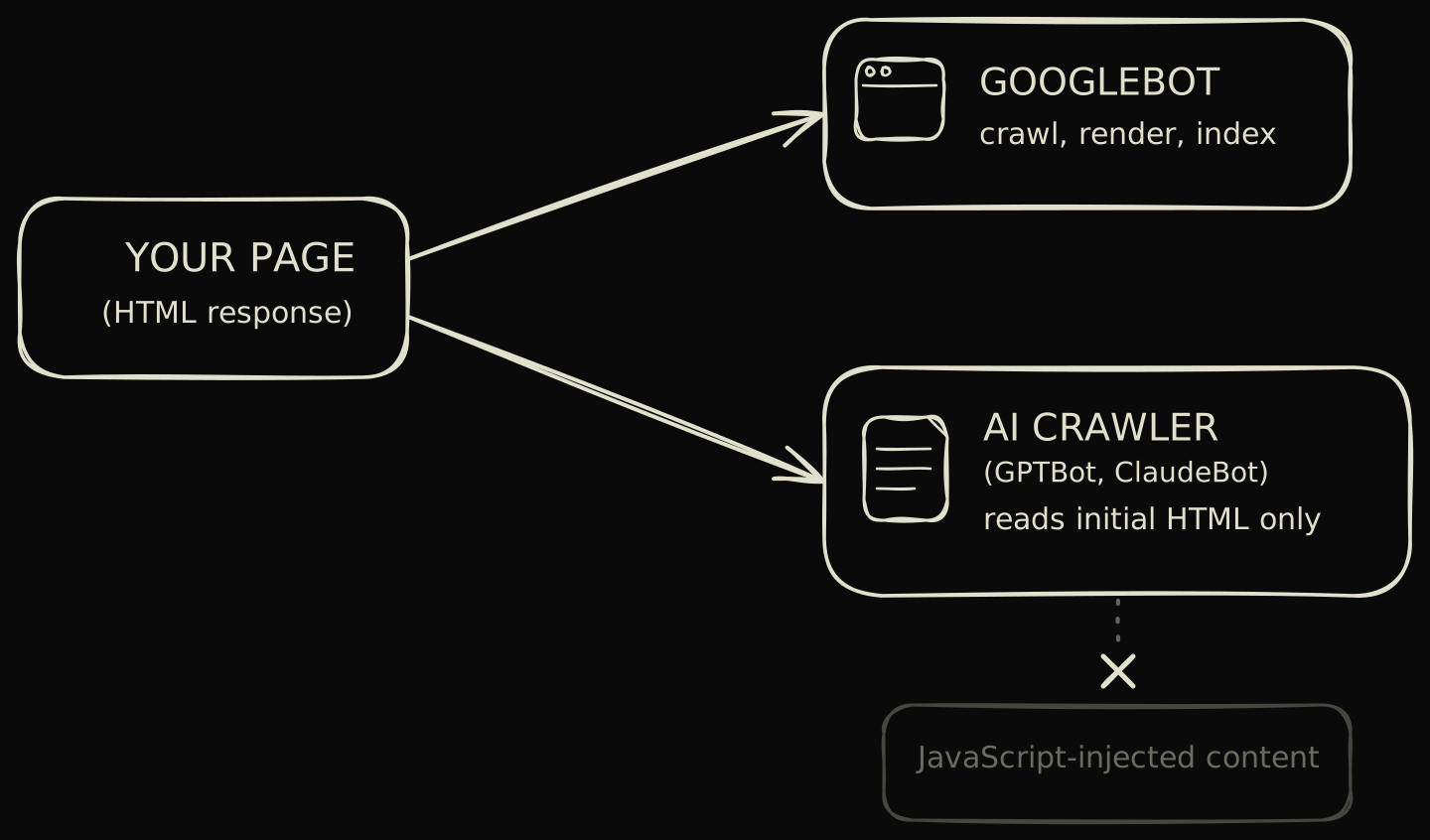
The split maps onto the crawl, index, and rank pipeline from chapter 1, with one twist. Both readers crawl, but only Google renders before it indexes. That one missing step is how the same URL can rank fine in Google yet never surface in an AI answer, and closing the gap is most of what this chapter does.
The crawl, render, index pipeline is where pages get lost
Google runs every page that returns an HTTP 200 through three phases, in order: crawl, render, index. The sequence comes straight from Google’s JavaScript SEO basics doc, which names the renderer, an evergreen Chromium, and confirms that every 200 page joins a render queue The Web Rendering Service (WRS) is Google’s headless, evergreen-Chromium renderer. It executes a page’s JavaScript so the indexer sees the final DOM rather than the raw HTML. before it can be indexed. A page can stall at any of the three, and each stall looks different.
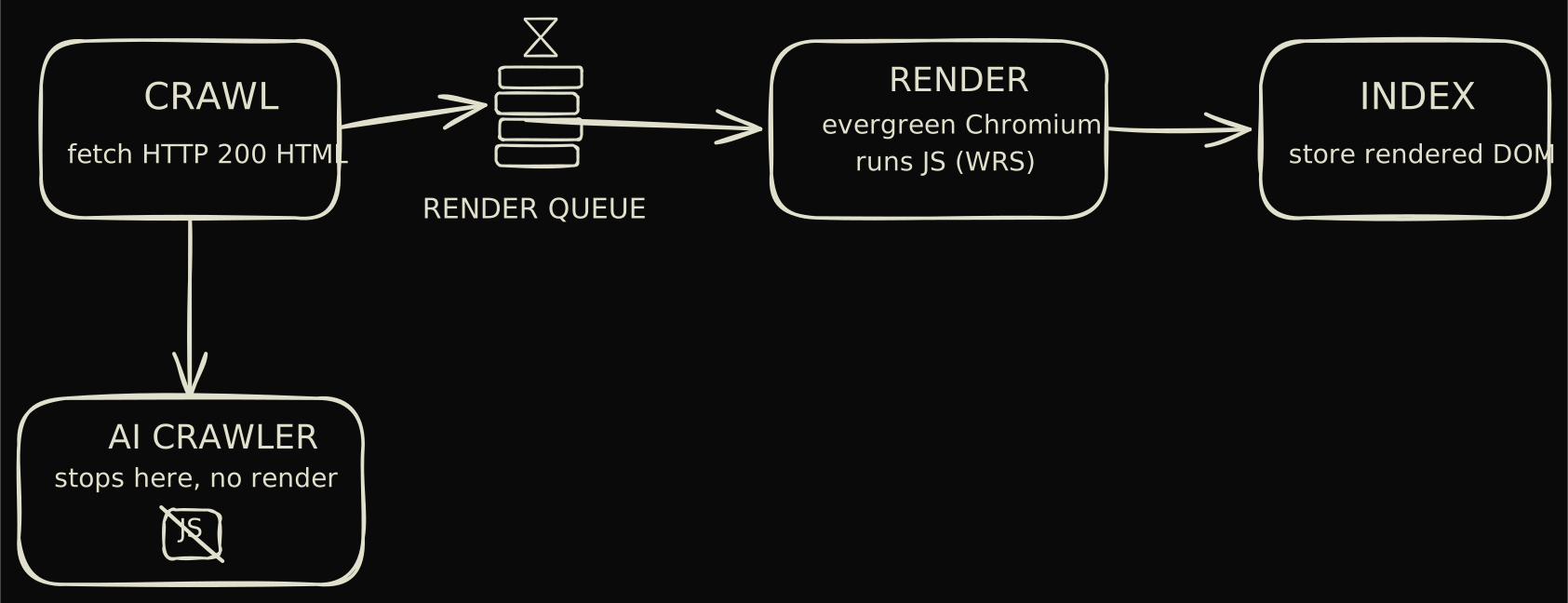
The render queue is the phase people underestimate. A page might get crawled within hours of publishing, then wait in the queue until rendering resources free up, sometimes briefly, sometimes not. So diagnosis starts with naming the failed phase, because a crawl problem like a robots block or a server error needs a completely different fix than content that only shows up after JavaScript runs.
AI crawlers never reach phases two and three. They crawl and stop. Whatever the server returned in phase one is the entire record, which makes the render step the exact point where the two readers part ways.
AI crawlers read your initial HTML and nothing more
GPTBot, ClaudeBot, PerplexityBot, and OAI-SearchBot all work the same way: request the URL, parse the response, move on. No browser, no script execution. A Search Engine Land guide to AI crawlers documents the behavior, and the consequence is blunt: anything your front end injects on the client does not exist for these bots.
That gives the rendering strategy more weight than it carried even five years ago. Client-side rendering (CSR) Client-side rendering ships a near-empty HTML shell plus a JavaScript bundle. The browser runs the bundle and builds the page in the user’s browser, so the content does not exist in the initial HTML response. builds the page in the visitor’s browser from a near-empty shell. Server-side rendering and prerendering ship finished markup in the response itself, and that response is the only thing an AI crawler will ever read.
Where this bites hardest is the React or Vue single-page app built on the App Shell Model The App Shell Model loads a minimal HTML skeleton first, then fills it with content over the network. It makes repeat visits feel fast, but the first response a crawler reads is the skeleton, not the content. . Googlebot gets there eventually, once the render queue does its work. An AI crawler files the shell and moves on, and a shell has nothing worth citing.
Crawl budget thinking has to account for AI request volume
Crawl budget Crawl budget is the number of URLs a crawler will fetch from your site in a given window, set by how fast your server responds and how much the crawler wants your pages. It only becomes a constraint on large or slow sites. used to be a single-crawler conversation, governed by Googlebot’s politeness rules and how fast your server answers. It isn’t anymore. AI crawlers stack a second stream of requests on the same origin, so budget now means managing two crawl patterns at once.
The streams also have different shapes. Around 65 percent of AI bot hits land on content updated within the past year, per the same Search Engine Land guide, so AI requests chase whatever you touched recently. Googlebot, meanwhile, keeps grinding through the whole site on its own schedule.
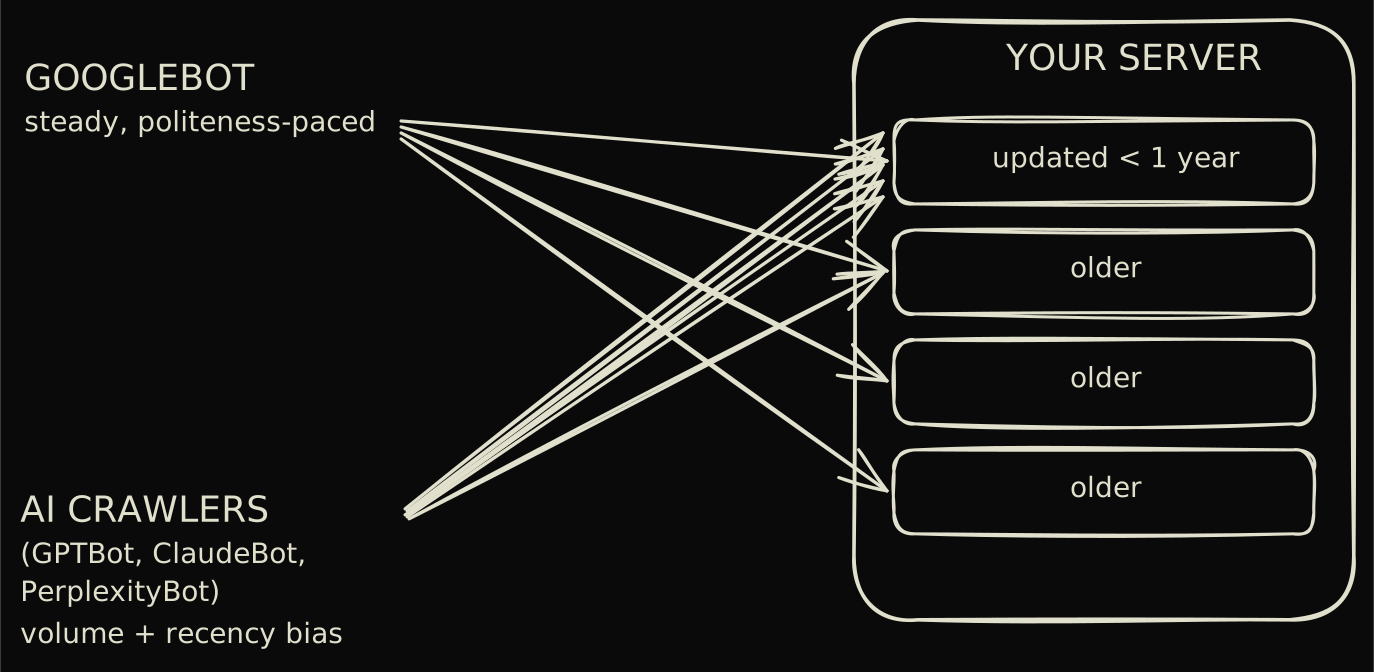
Both streams waste fetches on the same structural junk. A Semrush technical SEO checklist found orphan pages An orphan page is a URL with no internal links pointing to it. Crawlers can still reach it through a sitemap, but with no internal signal it tends to be crawled rarely and ranked weakly. on 69 percent of audited sites and broken internal links on 52 percent. Faceted navigation Faceted navigation is filter-and-sort UI that generates a new URL for each combination. Left uncontrolled, it can spawn thousands of near-duplicate pages that drain crawl budget. compounds the waste by minting a near-duplicate URL for every filter combination.
Server logs tell you what crawlers actually did
Server logs are ground truth. Search Console shows what Google reports about its own behavior, while the access log records the request that actually arrived, the status code it left with, and the exact user-agent that sent it. When the question is which bot fetched which page and which pages it skipped, nothing else answers it per bot.
- 01
Isolate the bot user-agents
Filter the log for Googlebot, GPTBot, ClaudeBot, PerplexityBot, and OAI-SearchBot. Verify Googlebot by reverse DNS, since the user-agent string alone is trivial to spoof. - 02
Group requests by path
Roll the filtered hits up by URL or directory. This shows which sections each crawler actually reaches and which it never touches. - 03
Compare coverage across readers
Lay Googlebot coverage next to ClaudeBot and GPTBot coverage. Pages Google fetches but AI bots skip are usually the client-rendered ones an AI crawler cannot read. - 04
Flag the fresh-content bias
Check whether AI bot hits cluster on recently updated URLs. If they do, your update cadence is steering where those readers spend their requests.
A page crawled but not indexed is usually one of four problems
“Crawled, currently not indexed” sounds terminal and isn’t. The status means Google fetched the page, looked at it, and declined to store it for now. The causes repeat so reliably you can work them as a fixed list: an empty render, a canonical pointing elsewhere, duplicate or thin content, or a soft 404.
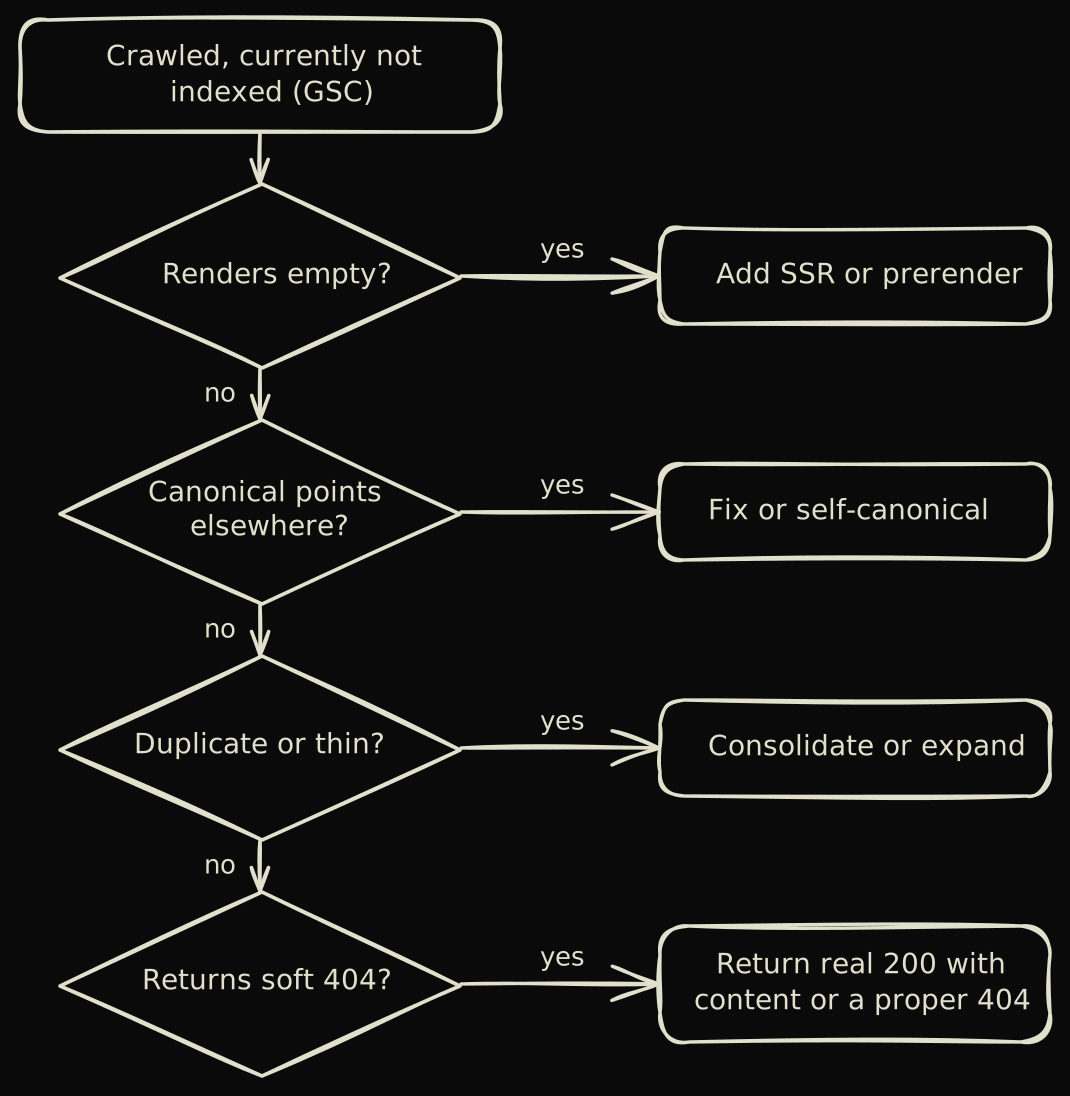
Work the URL through Search Console in order, one cause at a time. Skipping ahead is how people end up re-requesting indexing on a page that still has its original fault.
- 01
Run URL Inspection
Inspect the live URL in Search Console and read the coverage status and the last crawl date. This confirms Google fetched it and tells you what it saw. - 02
Check the rendered HTML
Use the rendered output in URL Inspection. If the body is empty, the page depends on client-side JavaScript and needs server-side rendering or a prerender. - 03
Check the canonical
Confirm the page is not canonicalizing to another URL. A canonical pointing elsewhere tells Google to index the other page instead of this one. - 04
Check for duplicate or thin content
Compare the page against near-identical URLs and judge whether it carries enough unique content to deserve its own index entry. Consolidate duplicates, expand thin pages. - 05
Request indexing
Once a real cause is fixed, request indexing for the URL. Without a fix first, re-requesting changes nothing.
All of this rests on the chapter 1 distinction that indexing and ranking are different jobs. A canonical URL A canonical URL is the version of a page you declare as the original when several URLs serve similar content. Google indexes the canonical and folds the duplicates into it. pointing the wrong way or a soft 404 A soft 404 is a page that returns HTTP 200 but has no real content, so Google treats it as a missing page. Common on empty search-result and out-of-stock pages. is an indexing fault, and you fix it long before ranking enters the conversation.
Sitemaps and crawler directives are the controls you actually hold
robots.txt, XML sitemaps, and the noindex and canonical signals are the levers you pull directly. Nearly everything else in SEO is persuasion, while these are instructions, and they happen to address both readers at once. That combination of direct control and double coverage is why cleaning them up pays better than almost any other technical task.
Start with robots.txt. Allow the live-search bots explicitly, and if you set a crawl delay at all, keep it short, since a long one throttles AI bots into irrelevance.
User-agent: *
Allow: /
Disallow: /cart
Disallow: /search

User-agent: OAI-SearchBot
Allow: /

User-agent: GPTBot
Allow: /

User-agent: ClaudeBot
Allow: /

Sitemap: https://example.com/sitemap.xml
Sitemaps reward restraint. List the URL, a truthful last-modified date, and stop there. Both readers use lastmod, and a stale or fabricated date teaches them to ignore yours.
<url>
<loc>https://example.com/seo/technical-seo/</loc>
<lastmod>2026-06-02</lastmod>
</url>
The three directives get mixed up constantly, and the mix-ups cost index coverage. The classic mistake is reaching for Disallow to pull a page out of the index, which achieves the opposite: a disallowed URL never gets crawled, so Google never reads the noindex tag that would have removed it The X-Robots-Tag is an HTTP header that carries the same directives as a robots meta tag, including noindex. It is the way to set noindex on non-HTML files like PDFs. .
Technical SEO for AI crawlers, answered
-
Do AI crawlers execute JavaScript?
No. GPTBot, ClaudeBot, PerplexityBot, and OAI-SearchBot fetch a URL and read the HTML the server returns, with no browser render step. Content that only appears after client-side JavaScript runs is invisible to them. -
What is the difference between llms.txt and robots.txt?
robots.txt is a long-standing standard that tells crawlers which paths they may fetch, and crawlers honor it. llms.txt is a proposed markdown file at the site root meant to point AI models at your best content. robots.txt is enforced, llms.txt is advisory and overridden by robots.txt on any conflict. -
Is llms.txt actually adopted by AI vendors?
Not in any confirmed way as of 2026. No major AI vendor has stated it reads llms.txt for ranking or retrieval, and adoption studies show single-digit-percentage uptake with no measured effect. It is worth shipping as cheap positioning, never as a ranking signal. -
How do I block or allow a specific AI crawler?
Add a User-agent block for that bot in robots.txt, then Allow or Disallow the paths. For example, a User-agent: GPTBot block with Disallow: / stops ChatGPT's training crawler while leaving Google and other bots untouched. Keep separate blocks for training crawlers and live-search bots like OAI-SearchBot. -
Why is my page crawled but not indexed?
Google fetched the page and chose not to store it. The usual causes are an empty client-side render, duplicate or thin content, a canonical pointing elsewhere, or a soft 404. Check the rendered HTML and the canonical in Search Console's URL Inspection, fix the cause, then request indexing. -
Is server-side rendering required for AI search?
It is required when content does not exist in the initial HTML. If your page is server-rendered, prerendered, or static, AI crawlers already read it. Only client-side-rendered pages that ship an empty shell need SSR or a prerender layer to be visible to AI answer engines.
llms.txt costs little and proves nothing yet
llms.txt has a real specification behind it, which already separates it from most AI-search folklore. The llmstxt.org proposal, published by Jeremy Howard in September 2024, describes a markdown file at the site root that hands language models a curated map of your most useful pages. The format is plain: a heading, a one-line summary, a list of links.
A minimal file looks like this.
# searchagents.co

> An opinion-led guide to SEO and AEO in 2026, from crawl to citation.

## Guide
- [How search engines work](https://searchagents.co/seo/how-search-engines-work/): the crawl, index, rank pipeline.
- [Technical SEO for two readers](https://searchagents.co/seo/technical-seo/): rendering, crawl budget, and directives.
Ship one if you like, the cost is close to zero. Just buy it with open eyes: no major AI vendor has confirmed it reads llms.txt, measured adoption sits in the low single digits, and robots.txt wins any conflict between the two. The file earns its keep as a tidy pointer to your best pages, never as a ranking play and never as a substitute for real on-page content.
Core Web Vitals still gate the Google half of the audience
Core Web Vitals (LCP, INP, CLS) measure how a page feels to a person: how fast it paints, how quickly it responds to input, how much it shifts around while loading. Google uses them as a ranking input. AI crawlers never render the page, so the metrics mean nothing to that half of the audience, and the effort should be budgeted accordingly.
The headroom is real, too. The same Semrush technical SEO checklist found 96 percent of audited sites failing at least one Core Web Vitals threshold. INP Interaction to Next Paint (INP) replaced First Input Delay (FID) as a Core Web Vital in March 2024. It measures responsiveness across all interactions on the page, not just the first. is the one most teams still haven’t caught up on.
One layer, two readers, cheapest wins first
Technical SEO in 2026 comes down to one layer serving two readers with different appetites. Google runs the full crawl, render, index pipeline and cares how fast and stable the page is once rendered. AI crawlers read the server’s response and nothing after it, so the only content they can reward is content that exists before the first script runs.
The encouraging part is how much the fixes overlap. Server-rendered or prerendered HTML satisfies Google’s render step and stands in for the one AI crawlers never had. Add clean sitemaps, a truthful robots.txt, and correctly scoped noindex and canonical signals, and you have covered nearly every control you hold outright.
For the structured-data side of being readable, chapter 5 on on-page SEO covers schema and markup in depth. The citation side, getting quoted rather than merely crawled, belongs to the AEO chapter, which picks up exactly where this one stops: at the render boundary.