Chrome added a Lighthouse category that scores your site for AI agents instead of human visitors, and the framing launched a small panic about a futuristic new discipline. Run it on a normal site and the panic deflates. Four of its six audits do not even apply, and the two that do are work you already owed human users: a well-formed accessibility tree and a stable layout.
Enable the Agentic Browsing category in the Lighthouse tab
The Agentic Browsing category lives in the Lighthouse panel inside Chrome DevTools, in the same place you run a performance audit. It shipped in Lighthouse 13.3.0, which rides along with Chrome 150, so enabling it means selecting the category, not installing anything.
- 01
Use Chrome 150 or newer
The Agentic Browsing category ships in Lighthouse 13.3.0, bundled with Chrome 150. If you do not see it in the category list, update Chrome, or install Chrome Canary to track the latest Lighthouse config. - 02
Right-click the page and choose Inspect
Open DevTools on the URL you want to test. The audit runs against whatever page is loaded, so test a real template, not just the homepage. - 03
Open the Lighthouse tab
It sits along the top row of DevTools panels, next to Elements and Console. Click it to load the audit configuration. - 04
Enable Agentic Browsing and run
Enable the Agentic Browsing category, then run the audit. The result comes back as a pass ratio, not the 0 to 100 score the other categories use.
The score is a ratio because Google has not written the rules yet
Agentic Browsing breaks Lighthouse’s own convention of a weighted 0 to 100 score, and the panel says why on its face: the category describes itself as “still under development and subject to change.” Google’s documentation adds that the standards for the agentic web are still emerging, so it reports a fraction of checks passed plus a pass or fail per audit, and deliberately skips the ranking.
Read the output as a checklist, not a grade. Audits that do not apply to your page, no forms to annotate, no llms.txt file, land in a “Not Applicable” bucket and drop out of the denominator. The run below scores 2 of 2 not because the site aced everything, but because only two of the six audits applied. Treat today’s pass ratio as a snapshot of a moving target.
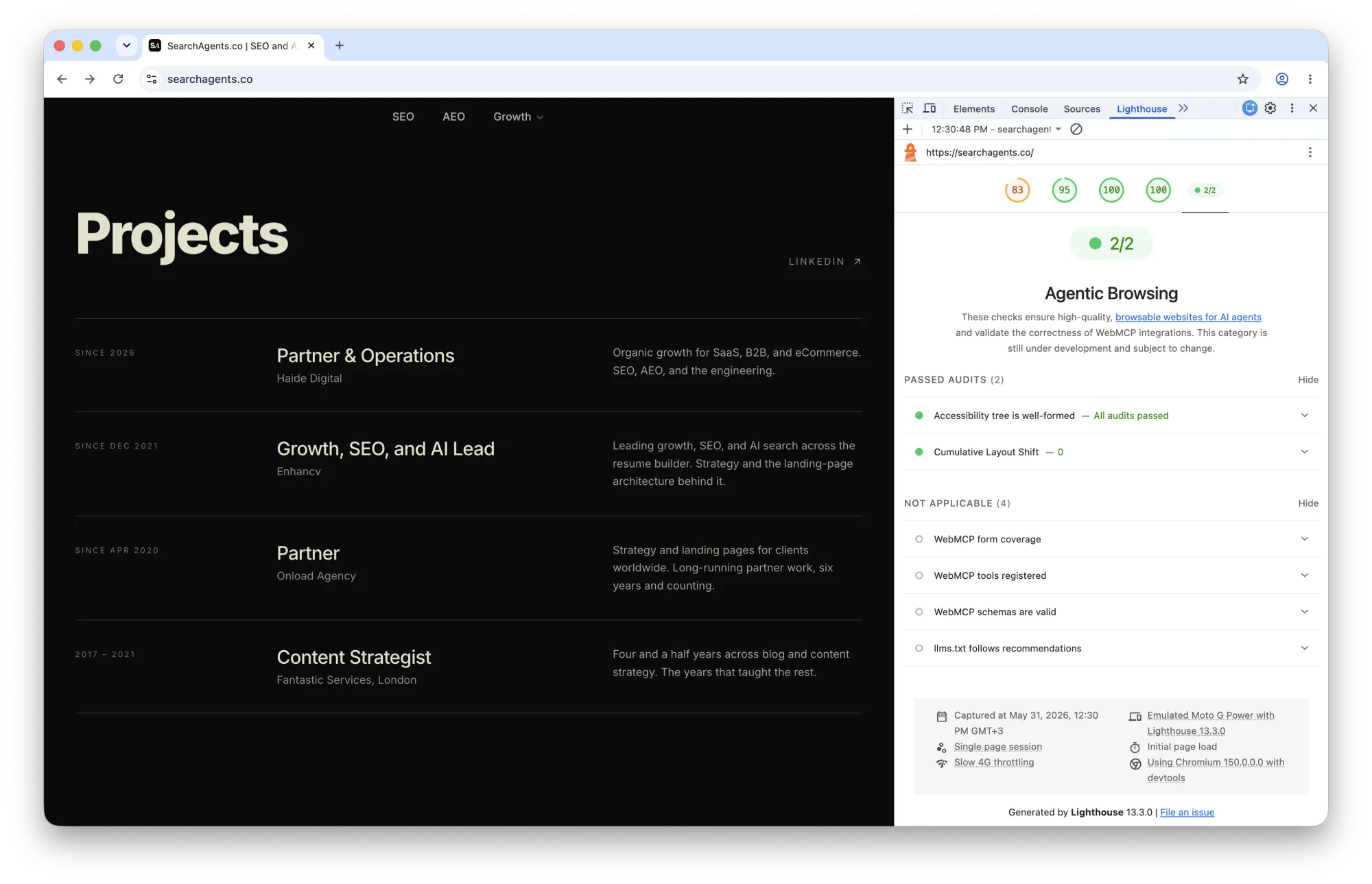
The two audits that apply are accessibility work in disguise
Strip out the Not Applicable rows and the agentic report is short. Two audits apply to a normal site, “Accessibility tree is well-formed” and “Cumulative Layout Shift,” and both predate the agentic web by years. That is the tell. The skill the report rewards is not new, it is the structured, labeled markup you already owed assistive technology.
The agents winning at browsing today read that same structure. Microsoft’s Playwright MCP uses an accessibility snapshot as its default page representation and clicks an element by a reference number tied to its name and role, not by screen coordinates. Open-source agents like browser-use navigate the same way, because the accessibility tree is a few hundred tokens where the raw DOM is tens of thousands. An agent that clicks “Add to cart” by its label is doing what a screen reader has done for twenty years.
The accessibility tree audit is the whole ballgame
Lighthouse rolls its agent-relevant accessibility checks into a single audit, “Accessibility tree is well-formed,” which expands to the underlying tests. These are the checks most sites can actually move this quarter, and the ones that help human users on the same ticket.
Underneath that one line sit three concerns. Names and labels verifies that every interactive element has a programmatic name, so an agent reads a button as “Add to cart” and not as an unlabeled icon it has to guess about. Tree integrity validates that ARIA roles and parent-child relationships are well-formed, so the structure the agent reads matches the structure on screen. Visibility confirms that content driving interaction is not hidden from the accessibility tree while staying clickable, the classic failure mode of a custom dropdown built from unlabeled divs. An unlabeled button is not low-priority for an agent. It is invisible.
WebMCP is the one genuinely new ask, and it is still a draft
WebMCP is the only area that asks for something you could not have built last year. WebMCP is a browser protocol, announced by Google and Microsoft in February 2026, that lets a site register actions an agent can call directly, search, filter, add to cart, instead of the agent reverse-engineering your UI. The report splits it into three audits, “WebMCP form coverage,” “WebMCP tools registered,” and “WebMCP schemas are valid,” and on a site without WebMCP all three read Not Applicable.
The imperative version registers a tool in JavaScript through document.modelContext.registerTool(); a declarative version in the explainer turns an existing form into a tool by annotating it. Treat a WebMCP gap as a roadmap item, not a bug. The specification is a community-group draft, not a W3C standard, and browser support is early. If you run an app or a commerce site where agents will transact, piloting the declarative API on one key form is a reasonable bet on where this goes. If you publish content, there is nothing to register yet.
CLS is the only check aimed at agents that still use screenshots
Cumulative Layout Shift earns its spot for the one camp of agents that does not read the tree. Vision-based agents, the screenshot-and-click approach used by tools like OpenAI’s Operator and Google’s Project Mariner, locate a button by its coordinates in an image, then click that position. If your layout jumps after the agent decided where to click, it misses, the same way a human reaches for a button that just moved.
The audit reuses your existing Core Web Vitals measurement, so there is nothing new to instrument, and in the run above it reads “Cumulative Layout Shift, 0,” a clean pass. If your vitals are healthy, this check passes for free, and if they are not, the fix helps every human visitor too. It is the lowest-effort pass in the report.
The llms.txt check barely checks anything
llms.txt is the audit generating the most noise and deserving the least. It is named “llms.txt follows recommendations,” and in the run above it sits in Not Applicable, because the site serves no such file. There is a small cottage industry promising to help you “pass the llms.txt audit,” and Chrome’s own documentation quietly undercuts it. The audit fails only if your server throws an error while serving the file. A missing file returns “Not Applicable,” not a fail, and the docs call it “optional at the moment.”
You cannot fail this check by not having an llms.txt file. That reframes the entire pitch. No major AI platform has confirmed it reads llms.txt, adoption sits in the low single digits, and Google itself describes it as an emerging convention rather than a requirement. Add the file if it costs you ten minutes and you like a clean report, but do not let an audit that returns “Not Applicable” for absence reorder your roadmap. The accessibility check moves real outcomes today. This one is a placeholder for a convention still waiting for a reader.
The Agentic Browsing report is best read as Google placing a bet in public. The web that agents browse today is split between the ones reading your accessibility tree and the ones squinting at screenshots, and the report puts Google’s chips on the tree. That is why the two audits that apply reward a legible accessibility tree and a stable layout, while the four sitting in Not Applicable wait on WebMCP and llms.txt to grow up. The practical order falls out of that. Fix the accessibility tree first, because it pays twice and the agents winning at browsing read it. Keep CLS healthy as part of normal Core Web Vitals work. Pilot WebMCP only if you run a site agents will transact on. And file the llms.txt panic under “optional,” because Google already did.
How search engines work
Crawling, indexing, and ranking, and how the same pipeline now feeds AI retrieval.
Google dropped FAQ rich results. Keep your FAQ schema.
A SERP feature went away. The markup still feeds LLMs, so the real audit is narrower than the panic.